Base class for all items that use the roviz framework. More...
#include <roviz_item.h>
Public Member Functions | |
| RovizItem (std::string type_name) | |
| virtual void | starting (void) |
| Called, when the thread is about to start. More... | |
| virtual void | thread (void)=0 |
| Main thread of the item. More... | |
| void | stop (void) override |
| Stop thread operation. More... | |
| virtual void | stopped (void) |
| Called after the thread stopped. More... | |
| template<class T > | |
| Input< T > | addInput (std::string name) |
| Add an input. More... | |
| template<class T > | |
| Output< T > | addOutput (std::string name) |
| Add an output. More... | |
| bool | waitForCond (std::function< bool(void)> cond) |
| Sleep until a condition comes true. More... | |
| bool | waitFor (std::function< bool(void)> cond) |
| Wait until a condition comes true. More... | |
| bool | wait (void) |
| Wait if the item is paused. More... | |
| bool | running (void) const override |
| Check if the thread is running. More... | |
| void | wake (void) const |
| Wake the possibly waiting thread. More... | |
| std::mutex & | mutex (void) const |
| Mutex that waitFor() locks to check the condidion. More... | |
| Trim | addTrim (std::string name, double default_value, double min, double max, std::function< void(double)> notifier_func) |
| Add a trim value. More... | |
| Trim | addTrim (std::string name, double default_value, double min, double max, bool logarithmic) |
| Add a trim value. More... | |
| Trim | addTrim (std::string name, double default_value, double min, double max, int steps, std::function< void(double)> notifier_func) |
| Add a trim value. More... | |
| Trim | addTrim (std::string name, double default_value, double min, double max, int steps=0, bool logarithmic=false, std::function< void(double)> notifier_func=[](double){}) |
| Add a trim value. More... | |
| Trim | addTrim (std::string name, double default_value, double min, double max, double step_size, std::function< void(double)> notifier_func=[](double){}) |
| Add a trim value. More... | |
| template<class T > | |
| Config< T > | addConfig (const std::string &name, const typename ConfigStorageType< T >::type &default_value, int min, int max, bool restart_when_changed=false) |
| Add a config for an integer value. More... | |
| template<class T > | |
| Config< T > | addConfig (const std::string &name, const typename ConfigStorageType< T >::type &default_value, double min, double max, bool restart_when_changed=false) |
| Add a config for a floating point (double) value. More... | |
| template<class T > | |
| Config< T > | addConfig (const std::string &name, const typename ConfigStorageType< T >::type &default_value, std::function< bool(std::string &)> checker=[](std::string &){return true;}, bool restart_when_changed=false) |
| Add a config for a string value. More... | |
| template<class T > | |
| Config< T > | addConfig (const std::string &name, const typename ConfigStorageType< T >::type &default_index, const std::list< std::string > &possibilities, bool restart_when_changed=false) |
| Add a config for a list of strings. More... | |
| template<class T > | |
| Config< T > | addConfig (const std::string &name, const typename ConfigStorageType< T >::type &default_value, bool restart_when_changed=false) |
| Add a config for a boolean value. More... | |
| template<class T > | |
| Config< T > | addConfig (const std::string &name, const typename ConfigStorageType< T >::type &default_value, enum FilePath::Mode file_mode, const std::string &filter, bool restart_when_changed=false) |
| Add a config for an integer value. More... | |
| template<> | |
| Config< int > | addConfig (const std::string &name, const ConfigStorageType< int >::type &default_value, int min, int max, bool restart_when_changed) |
| template<> | |
| Config< double > | addConfig (const std::string &name, const ConfigStorageType< double >::type &default_value, double min, double max, bool restart_when_changed) |
| template<> | |
| Config< bool > | addConfig (const std::string &name, const ConfigStorageType< bool >::type &default_value, bool restart_when_changed) |
| template<> | |
| Config< FilePath > | addConfig (const std::string &name, const ConfigStorageType< FilePath >::type &default_value, FilePath::Mode file_mode, const std::string &filter, bool restart_when_changed) |
Detailed Description
Base class for all items that use the roviz framework.
All items using the roviz framework have to inherit from this class. They have to at least implement thread(). This function will run in a seperate thread and can process the data.
The templated functions need to know on what kind of stream they operate. Examples might be Image or Message. You can also implement your own stream-type. Look at StreamObject for more information.
- See also
- RovizItemBase
- RovizItemNoExport
Constructor & Destructor Documentation
◆ RovizItem()
|
explicit |
- Parameters
-
type_name The name of the item

Member Function Documentation
◆ addConfig() [1/6]
| Config<T> RovizItem::addConfig | ( | const std::string & | name, |
| const typename ConfigStorageType< T >::type & | default_value, | ||
| int | min, | ||
| int | max, | ||
| bool | restart_when_changed = false |
||
| ) |
Add a config for an integer value.
- Parameters
-
name Name of the config default_value Default value if nothing is saved in the config file min Lowest possible value max Highest possible value restart_when_changed If true, the item will be restarted when changes to the config are applied
- Returns
- The newly created config
◆ addConfig() [2/6]
| Config<T> RovizItem::addConfig | ( | const std::string & | name, |
| const typename ConfigStorageType< T >::type & | default_value, | ||
| double | min, | ||
| double | max, | ||
| bool | restart_when_changed = false |
||
| ) |
Add a config for a floating point (double) value.
- Parameters
-
name Name of the config default_value Default value if nothing is saved in the config file min Lowest possible value max Highest possible value restart_when_changed If true, the item will be restarted when changes to the config are applied
- Returns
- The newly created config
◆ addConfig() [3/6]
| Config<T> RovizItem::addConfig | ( | const std::string & | name, |
| const typename ConfigStorageType< T >::type & | default_value, | ||
| std::function< bool(std::string &)> | checker = [](std::string &){return true;}, |
||
| bool | restart_when_changed = false |
||
| ) |
Add a config for a string value.
- Parameters
-
name Name of the config default_value Default value if nothing is saved in the config file checker Function that checks if a string is a valid possible input. Returns true, if it's valid, false otherwise. restart_when_changed If true, the item will be restarted when changes to the config are applied
- Returns
- The newly created config
◆ addConfig() [4/6]
| Config<T> RovizItem::addConfig | ( | const std::string & | name, |
| const typename ConfigStorageType< T >::type & | default_index, | ||
| const std::list< std::string > & | possibilities, | ||
| bool | restart_when_changed = false |
||
| ) |
Add a config for a list of strings.
- Parameters
-
name Name of the config default_index Default index if nothing is saved in the config file possibilities A list of all possible values restart_when_changed If true, the item will be restarted when changes to the config are applied
- Returns
- The newly created config
◆ addConfig() [5/6]
| Config<T> RovizItem::addConfig | ( | const std::string & | name, |
| const typename ConfigStorageType< T >::type & | default_value, | ||
| bool | restart_when_changed = false |
||
| ) |
Add a config for a boolean value.
- Parameters
-
name Name of the config default_value Default value if nothing is saved in the config file restart_when_changed If true, the item will be restarted when changes to the config are applied
- Returns
- The newly created config
◆ addConfig() [6/6]
| Config<T> RovizItem::addConfig | ( | const std::string & | name, |
| const typename ConfigStorageType< T >::type & | default_value, | ||
| enum FilePath::Mode | file_mode, | ||
| const std::string & | filter, | ||
| bool | restart_when_changed = false |
||
| ) |
Add a config for an integer value.
- Parameters
-
name Name of the config default_value Default value if nothing is saved in the config file file_mode Determines, what can be selected (see FilePath::Mode) filter Filter the allowed file types restart_when_changed If true, the item will be restarted when changes to the config are applied
- Returns
- The newly created config
◆ addInput()
| Input< T > RovizItem::addInput | ( | std::string | name | ) |
◆ addOutput()
| Output< T > RovizItem::addOutput | ( | std::string | name | ) |
Add an output.
- Parameters
-
name Name of the output
- Returns
- Handle to that output
- See also
- addInput
- pushOut
◆ addTrim() [1/5]
| Trim RovizItem::addTrim | ( | std::string | name, |
| double | default_value, | ||
| double | min, | ||
| double | max, | ||
| std::function< void(double)> | notifier_func | ||
| ) |
Add a trim value.
- Parameters
-
name Name of the value min Minimum value max Maximum value notifier_func Function that gets called when the value of the Trim changes
- Returns
- Handle to the trim value
A trim value is a value, that can be adjusted (trimmed) at runtime. The user can changed it e.g. through a slider on a GUI.
◆ addTrim() [2/5]
| Trim RovizItem::addTrim | ( | std::string | name, |
| double | default_value, | ||
| double | min, | ||
| double | max, | ||
| bool | logarithmic | ||
| ) |
Add a trim value.
- Parameters
-
name Name of the value min Minimum value max Maximum value logarithmic If true, the slider will have a logarithmic scale instead of a linear one.
- Returns
- Handle to the trim value
A trim value is a value, that can be adjusted (trimmed) at runtime. The user can changed it e.g. through a slider on a GUI.
◆ addTrim() [3/5]
| Trim RovizItem::addTrim | ( | std::string | name, |
| double | default_value, | ||
| double | min, | ||
| double | max, | ||
| int | steps, | ||
| std::function< void(double)> | notifier_func | ||
| ) |
Add a trim value.
- Parameters
-
name Name of the value min Minimum value max Maximum value steps Number of steps between min and max notifier_func Function that gets called when the value of the Trim changes
- Returns
- Handle to the trim value
A trim value is a value, that can be adjusted (trimmed) at runtime. The user can changed it e.g. through a slider on a GUI.
◆ addTrim() [4/5]
| Trim RovizItem::addTrim | ( | std::string | name, |
| double | default_value, | ||
| double | min, | ||
| double | max, | ||
| int | steps = 0, |
||
| bool | logarithmic = false, |
||
| std::function< void(double)> | notifier_func = [](double){} |
||
| ) |
Add a trim value.
- Parameters
-
name Name of the value min Minimum value max Maximum value steps Number of steps between min and max logarithmic If true, the slider will have a logarithmic scale instead of a linear one. notifier_func Function that gets called when the value of the Trim changes
- Returns
- Handle to the trim value
A trim value is a value, that can be adjusted (trimmed) at runtime. The user can changed it e.g. through a slider on a GUI.
◆ addTrim() [5/5]
| Trim RovizItem::addTrim | ( | std::string | name, |
| double | default_value, | ||
| double | min, | ||
| double | max, | ||
| double | step_size, | ||
| std::function< void(double)> | notifier_func = [](double){} |
||
| ) |
Add a trim value.
- Parameters
-
name Name of the value min Minimum value max Maximum value step_size Value of the smallest possible change that you can make with the slider. notifier_func Function that gets called when the value of the Trim changes
- Returns
- Handle to the trim value
A trim value is a value, that can be adjusted (trimmed) at runtime. The user can changed it e.g. through a slider on a GUI.
◆ mutex()
| std::mutex & RovizItem::mutex | ( | void | ) | const |
Mutex that waitFor() locks to check the condidion.
- Returns
- Mutex that waitFor() locks to check the condidion
Only change the condition waitFor() is waiting for while holding this mutex!
- See also
- waitFor
- waitForCond

◆ running()
|
override |
Check if the thread is running.
- Returns
- true, if the thread is running false, if the thread is paused or stopped
This function does not handle start/pause/stop events itself. It could be used in event handlers, to check, whether they have to process this event, because it doesn't make sense to do that if the thread isn't running anyway. It normally doesn't make much sense to call this function from the thread() function. Use wait() instead for that.
◆ starting()
|
virtual |
Called, when the thread is about to start.
Use this function to reset, clear and initialize everything that might change during runtime. After the call to this function, the item has to be in a clean, fresh state. The item is not allowed to have any information of the previous "session" or thread run left. That would defy the purpose of the start/stop mechanism. The inputs/outputs and trims/configs are preserved, you can set them in the constructor. The thread doesn't run yet at this point.
- See also
- stopped
Reimplemented in GrayConvItem, and SubtractorItem.

◆ stop()
|
override |
Stop thread operation.
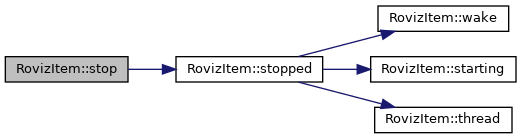
Important: You have to call this function in the destructor, otherwise the thread might still run after destruction of the members, even if it is called in the base class destructor.

◆ stopped()
|
virtual |
Called after the thread stopped.
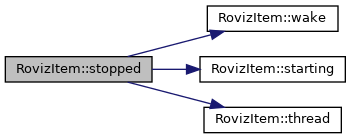
Called after the thread stopped. You can do some cleanup here if you like.
- See also
- starting
Reimplemented in CvCameraItem.

◆ thread()
|
pure virtual |
Main thread of the item.
This function will be executed in a different thread and you can process the image data in here.
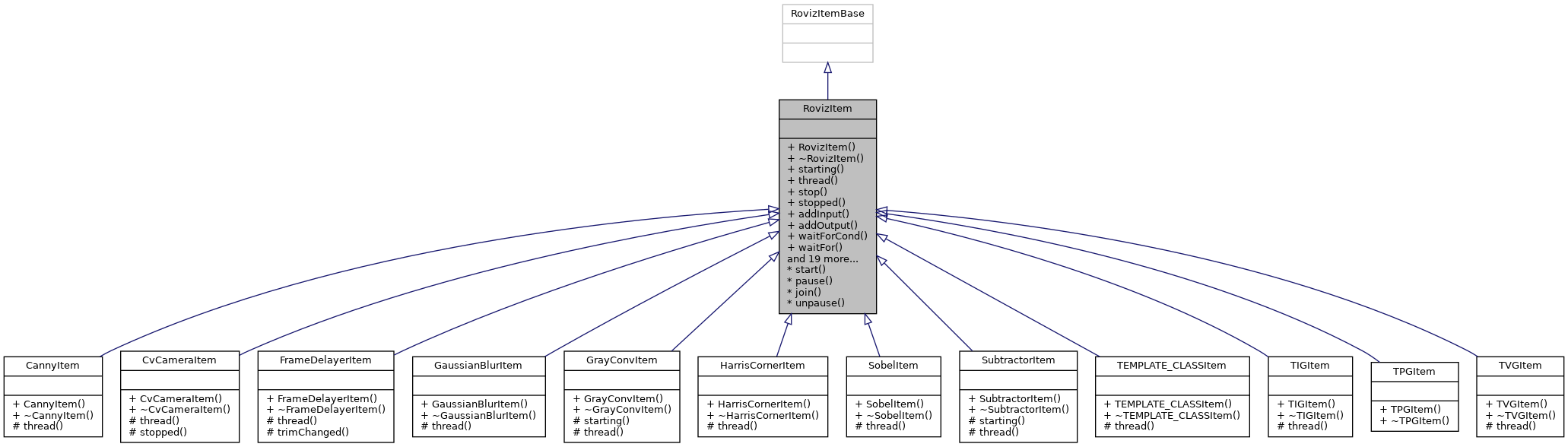
Implemented in FrameDelayerItem, GaussianBlurItem, GrayConvItem, SubtractorItem, TIGItem, TVGItem, CvCameraItem, CannyItem, HarrisCornerItem, SobelItem, and TEMPLATE_CLASSItem.

◆ wait()
| bool RovizItem::wait | ( | void | ) |
Wait if the item is paused.
- Returns
- true - No need to wait any further false - The item was stopped, the thread HAS TO exit
This function could be used for image sources that don't need a condidion to be true to generate an image.
This function implements the pause/stop mechanism. It doesn't return as long as the item is paused and returns false if it is stopped. It is important that the thread exits when this happens!
◆ waitFor()
| bool RovizItem::waitFor | ( | std::function< bool(void)> | cond | ) |
Wait until a condition comes true.
- Parameters
-
cond Condition to wait for
- Returns
- true - The condition returned true false - The item was stopped, the thread HAS TO exit
This function could be used by image sources that have to wait for hardware events. It will wait until the cond function returns true. The cond function will be called periodically. Unlike waitForCond(), this functions guarantees that the condition is evatluated periodically. This function will aquire the mutex returned by mutex() while executing cond. Make sure you only manipulate the condition while holding that mutex.
This function implements the pause/stop mechanism. It doesn't return as long as the item is paused and returns false if it is stopped. It is important that the thread exits when this happens!
◆ waitForCond()
| bool RovizItem::waitForCond | ( | std::function< bool(void)> | cond | ) |
Sleep until a condition comes true.
- Parameters
-
cond Condition to wait for
- Returns
- true - The condition returned true false - The item was stopped, the thread HAS TO exit
This function could be used by image sources that have to wait for hardware events. It will wait until the cond function returns true. The cond function will be called periodically. It might happen, that the thread keeps sleeping and doesn't notice that the condition changed. Use wake() from an event handler or interrupt or something similar to ensure the thread checks the condidion again. If this is not possible, use the less efficient waitFor() instead. This function will aquire the mutex returned by mutex() while executing cond. Make sure you only manipulate the condition while holding that mutex.
This function implements the pause/stop mechanism. It doesn't return as long as the item is paused and returns false if it is stopped. It is important that the thread exits when this happens!
◆ wake()
| void RovizItem::wake | ( | void | ) | const |
Wake the possibly waiting thread.
If you know the thread is waiting for a condidion and e.g. an event handler sees that the condidion has changed, it's a good idea to notify the thread and wake it up.
- See also
- waitFor

The documentation for this class was generated from the following files:
- usercore/include/core/roviz_item.h
- usercore/src/core/roviz_item.cpp