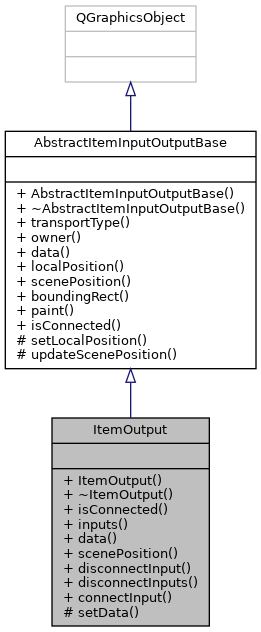
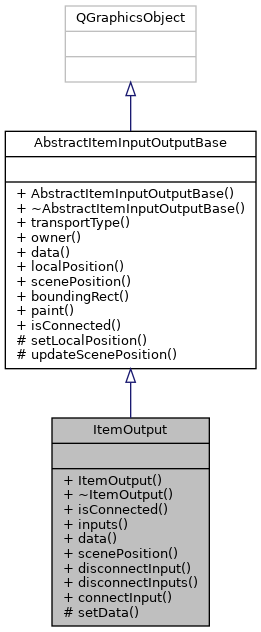
The ItemOutput class represents an output that belongs to an item. More...
#include <item_output.h>
Signals | |
| void | inputDisconnected () |
| This signal is emitted whenever an input this output is connected to is disconnected. More... | |
| void | inputConnected () |
| This signal is emitted whenever a new input is connected to this output. More... | |
| void | dataChanged () |
| This signal is emitted whenever the data provided by this output has changed. More... | |
 Signals inherited from AbstractItemInputOutputBase Signals inherited from AbstractItemInputOutputBase | |
| void | positionChanged () |
| This signal is emitted whenever this objects local or scene position has changed. More... | |
Public Member Functions | |
| ItemOutput (AbstractItem *owner, int transportType, QString const &description, QRectF const &shape={0, 0, 0, 0}) | |
| Constructs an ItemOutput. More... | |
| virtual bool | isConnected () const |
| QList< ItemInput * > | inputs () const |
| QObject * | data () const |
| virtual QPointF | scenePosition () const |
| Returns the scene position of this object. More... | |
| void | disconnectInput (ItemInput *input) |
| Disconnects the input input from this output. More... | |
| void | disconnectInputs () |
| Disconnects all connected inputs from this output. More... | |
| bool | connectInput (ItemInput *input) |
| Connects this output to the input input. More... | |
| Public Member Functions inherited from AbstractItemInputOutputBase | |
| AbstractItemInputOutputBase (class AbstractItem *parent, int transportType, QString const &description, QRectF const &shape) | |
| Constructs an AbstractItemInputOutputBase. More... | |
| int | transportType () const |
| Returns the type of data this object handles. More... | |
| AbstractItem * | owner () const |
| Returns the owner of this object. More... | |
| virtual QPointF | localPosition () const |
| Returns the local position of this object. More... | |
| virtual QRectF | boundingRect () const |
| virtual void | paint (QPainter *painter, QStyleOptionGraphicsItem const *option, QWidget *widget) |
Protected Member Functions | |
| void | setData (QObject *data) |
| Sets the data provided by this output to data. Causes this output and the connected inputs to emit the dataChanged signal. More... | |
| Protected Member Functions inherited from AbstractItemInputOutputBase | |
| void | setLocalPosition (QPointF const &position) |
| Sets the local position of this object. More... | |
| void | updateScenePosition () |
| Updates the scene position. Causes this objects position within the item scene to be updated. More... | |
Detailed Description
The ItemOutput class represents an output that belongs to an item.
An output can be connected to zero or more inputs which may read its data.
An outputs transport type specifies what type of data it supports. Only inputs and outputs that have the same transport type may be connected to each other. See the AbstractItem class for a description of the transport type.
- See also
- Item
- ItemInput
- ItemInputOutputBase
Constructor & Destructor Documentation
◆ ItemOutput()
| ItemOutput::ItemOutput | ( | AbstractItem * | owner, |
| int | transportType, | ||
| QString const & | description, | ||
| QRectF const & | shape = {0, 0, 0, 0} |
||
| ) |
Constructs an ItemOutput.
- Parameters
-
owner The Item this output belongs to transportType The type of data this output provides description A description of this output that is shown to the user shape The shape of this output
Member Function Documentation
◆ connectInput()
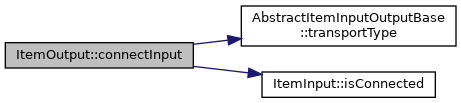
| bool ItemOutput::connectInput | ( | ItemInput * | input | ) |
Connects this output to the input input.
- Parameters
-
input The input this output is to be connected to
- Returns
- true upon success, false otherwise. The function fails if a NULL output is provided, or if the types of data of the output and input do not match, or if the input is already connected to an output, or if this output is already connected to the input input
- See also
- disconnectInput
- disconnectInputs
◆ data()
|
virtual |
- Returns
- A pointer to the data provided by this output
Implements AbstractItemInputOutputBase.

◆ dataChanged
|
signal |
This signal is emitted whenever the data provided by this output has changed.
- See also
- setData

◆ disconnectInput()
| void ItemOutput::disconnectInput | ( | ItemInput * | input | ) |
Disconnects the input input from this output.
- See also
- disconnectInputs
- connectInput
◆ disconnectInputs()
| void ItemOutput::disconnectInputs | ( | ) |
Disconnects all connected inputs from this output.
- See also
- disconnectInput
- connectInput

◆ inputConnected
|
signal |
This signal is emitted whenever a new input is connected to this output.
- See also
- inputDisconnected
◆ inputDisconnected
|
signal |
This signal is emitted whenever an input this output is connected to is disconnected.
- See also
- inputConnected
◆ inputs()
| QList< ItemInput * > ItemOutput::inputs | ( | ) | const |
- Returns
- A list of pointers to the inputs this output is connected to. The list is empty iff this output is not connected to any inputs
◆ isConnected()
|
virtual |
- Returns
- true if this output is connected to at least one input, false otherwise
Implements AbstractItemInputOutputBase.
◆ scenePosition()
|
virtual |
Returns the scene position of this object.
- Returns
- The scene position of this object
- See also
- localPosition
Reimplemented from AbstractItemInputOutputBase.

◆ setData()
|
protected |
Sets the data provided by this output to data. Causes this output and the connected inputs to emit the dataChanged signal.
- Parameters
-
data A pointer to the new data
- See also
- dataChanged


The documentation for this class was generated from the following files:
- itemframework/itemframework/include/item/item_output.h
- itemframework/itemframework/moc/moc_item_output.cpp
- itemframework/itemframework/src/item/item_output.cpp